Search engine optimization has had a technical element that causes even seasoned specialists to discombobulate, however, JavaScript SEO: how Googlebot renders JS might be the trickiest of them all. If you have a website where a ton of your content is rendered with JavaScript, it's crucial you find out how Google really views your pages. The fact of the matter: it may not be exactly what your users see.
This is not an obscure issue for big tech. Blogs, ecommerce stores, portfolios - for virtually any site designed with React, Vue, Angular, Next.js, or other JS library - this is your headache. Learning how Googlebot interacts with your JavaScript code may be the factor that elevates you above the midpack to sit on the top of Google's first page.
We'll translate it all into plain English.
What Is Googlebot, Really?
What is Googlebot?
Googlebot is the web crawling software (or crawler) used by Google that visits your website, reads its content, and reports back to Google about your pages so they can be indexed and ranked. It's like a reader who gets through a billion pages in no time and takes notes. And the problem?
Googlebot doesn't load websites the way humans do. It's not as smooth as browsing with Chrome - and by the way, when it comes to JavaScript, that can be an issue.
JavaScript SEO: How Googlebot Renders JS Process
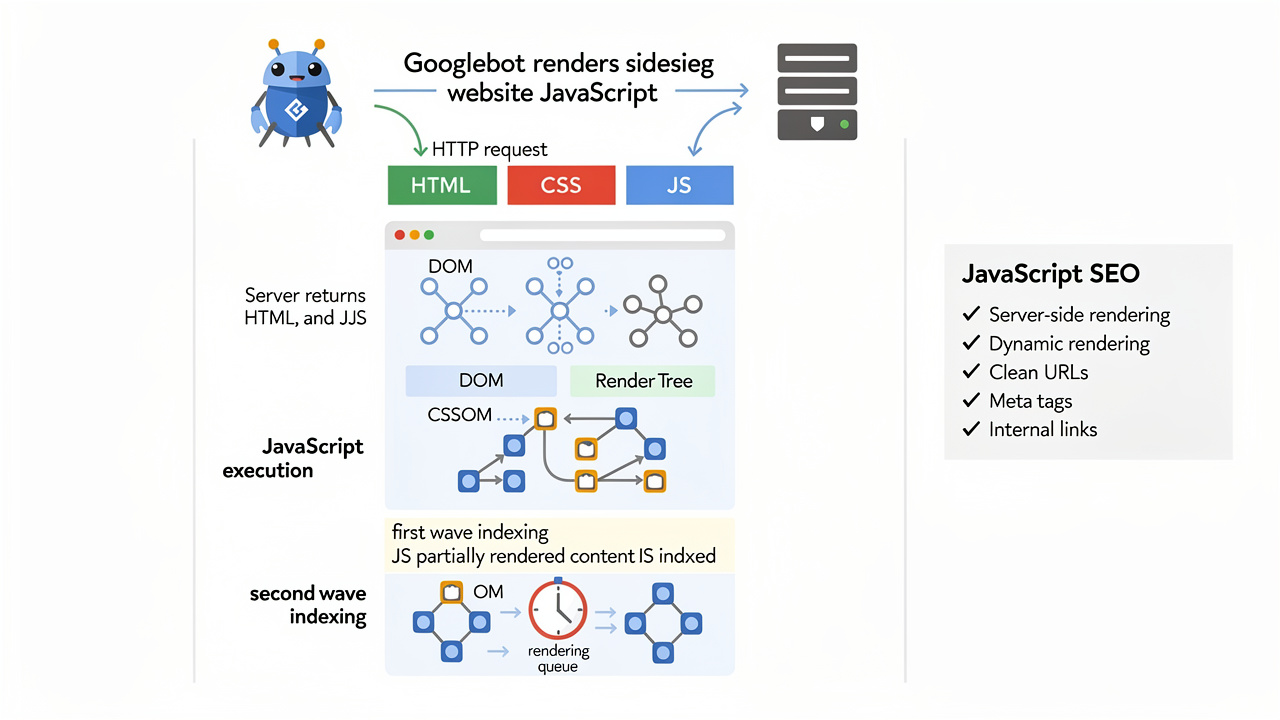
To make things even more complicated, Google has to crawl JavaScript-heavy pages in two stages. The so-called two-wave index explained, and what it means for your content - and it is actually pretty vital knowledge:
Wave 1: Google Gathers the Raw HTML Googlebot grabs your page's raw HTML first. This is what exists in the raw page source. Here's the crucial bit: until the page's HTML is run through JavaScript, the only content available to Google is what's in the initial HTML document. If your content can be found here, you're good. If your page is more of a "shell" that requires JavaScript to become functional, Googlebot doesn't actually find all that much here.
Wave 2: Google Turns Your Page into a Browser and Checks the Output Sometime after the initial crawl - hours, days, maybe longer - Google shoots the page to a service called the Web Rendering Service (WRS). Which runs all the JavaScript, creates the rendered page you see in your browsers, and takes another pass through the content before any of it is indexed.
How Googlebot's Browser Actually Works
Googlebot also has a Chromium driver to render JavaScript (which is reassuring until you remember it's not always the latest). In the past Google has used a slightly older version of Chrome's rendering engine, so new JavaScript features may not work as expected. Here's what you need to know about Googlebot's rendering environment:
- It renders pages without cookies (by default)
- It doesn't execute JavaScript that requires user interaction to trigger
- It can't log in or access content behind authentication walls
- Resources blocked in your robots.txt file won't load during rendering — which can seriously break how your page looks to Googlebot
- It processes pages with limited computational resources compared to a desktop browser
Thus, if your navigation bar only shows after a user has clicked on something, Googlebot is unlikely to see it. If your product descriptions are loaded through an API call that requires a session token, again, it's unlikely Googlebot will be able to access that information.
Common JavaScript SEO Problems (and What Causes Them)
Here's where it gets real. These are the issues most common for JavaScript rich sites stumbling in the rankings:
-
Content hidden behind JavaScript - if your body copy, headings, or data only appear after JavaScript executes, you're relying on Wave 2. That's dangerous territory. If that rendering fails, the page and its content are gone.
-
Lazy loading issues - lazy loading images and content is excellent for performance, but if it's flakey, Googlebot isn't getting to the bottom of the page and the images won't load.
-
Infinite scrolling without pagination - infinite scroll is excellent for conversion and UX, but for Googlebot it's a bottomless pit. If you use it without a clear fallback to pagination, Googlebot is only seeing the first batch of results.
-
JavaScript created internal links - internal links are essential for SEO - especially for Googlebot discovering new pages. If those links are created in JavaScript, they might not be followed as Googlebot isn't executing the JS.
-
Slow JS execution - Googlebot has a crawl budget. If your JavaScript takes too long to execute, Googlebot will give up and go home.
Rendering Approaches: Which One Is Best for SEO?
How developers manage this can have very different consequences for SEO. You can: Use CSR - load the entire page in the browser using Javascript (essentially the HTML is blank). This is the worst for SEO as it means we're on Wave 2 entirely and all the stuff we've already talked about applies; Use SSR - generate the full HTML in the server before serving up to the browser.
This is generally the best as it means Wave 1 with all the stuff we've already talked about; Use SSG - pre-build full HTML pages at build time to serve up to the browser. This is even better than SSR - the HTML is ready from the off, there's no real server delay and Google gets the whole thing on Wave 1. Use dynamic rendering - serve static HTML for crawlers but JS for the user (Microsoft recommends this as a stopgap rather than a solution).
JavaScript SEO: How Googlebot Renders JS Optimization
So what can you actually do with all of this?
Here are real-world tips to get the most out of Googlebot's JavaScript crawl:
-
Audit your site with Google Search Console. The URL Inspection tool lets you see how Google actually renders your pages. Use it regularly — it's free and incredibly revealing.
-
Test with "Fetch as Google." This shows you the rendered version of your page. If it looks broken or missing content, that's exactly what Googlebot sees.
-
Move critical content to the initial HTML. Titles, meta descriptions, main headings, and core body text should ideally exist in the raw HTML, not require JavaScript to appear.
-
Use structured data in the HTML, not generated by JavaScript. Schema markup is important for rich results — and if it's only added via JavaScript, there's a chance it won't be processed correctly.
-
Check your robots.txt file. Make sure you're not accidentally blocking JavaScript files, CSS files, or external resources that your page needs to render properly.
-
Implement proper pagination. If you use infinite scroll, add paginated alternatives (like numbered pages or "load more" buttons that update the URL) so Googlebot can crawl deeper content.
-
Monitor your Core Web Vitals. Page speed affects both user experience and SEO. Heavy JavaScript can drag down your performance scores, which Google uses as a ranking signal.
-
Consider SSR or SSG if you're building something new. Frameworks like Next.js (for React) and Nuxt.js (for Vue) make server-side rendering much more accessible than it used to be.
A Quick Reality Check
Listen, JavaScript SEO isn't something that most websites owners need to be checking on daily. If your site is on WordPress, uses a non-JavaScript-based CMS, or returns static HTML you're probably OK. These issues tend to pop up when you have a single-page application or a site that loads massive amounts of content dynamically.
However, if you've found that your content seems to have been unindexed, or your rankings fell after a site change, JavaScript rendering issues may be to blame. These are problems that tend to go completely under the radar until it's too late.
The Bottom Line
JavaScript is Everywhere on the Web Today and It's Still Not Going Away. Google has made huge strides with JavaScript this past five or six years, but it's still not perfect, and those delays and constraints still exist. The surest route to JavaScript SEO disaster is to unnecessarily make Googlebot work harder.
Deliver your content in the HTML when you can, use server-side and static rendering when you can, and, of course, use Google Search Console and Fetch as Google to see what Google is seeing, not what you wish were seeing.